
Check-in and check-out
Every handover recorded, signed and ready as a PDF.
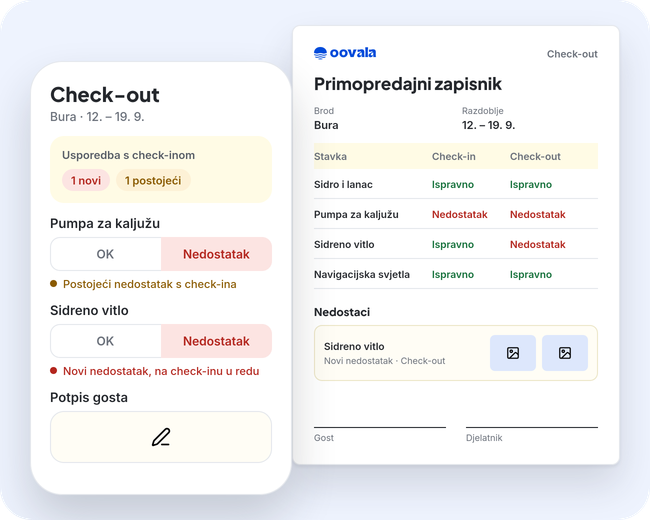
You build the checklists, the team fills them in on the phone, and guest and employee sign on the device. At check-out you see right away what is new and what was already there.
How it works
- 1
Build a checklist
Text, numbers, options, date, photos, an attachment and OK/defect fields. Use the same form for every boat.
- 2
Fill it in on the phone
When an item is not in order, a defect report opens. Guest and employee sign on the device.
- 3
Compare and save
Check-out is compared with check-in and marks new and existing defects. A signed handover is locked, and you download the PDF when you need it.
What you get
- Checklist fields: short and long text, options, date, number, number with unit, photo, attachment and OK/defect
- A failed item opens a defect report
- Guest and employee sign on the device
- Check-out is compared with check-in; every defect is marked new or existing
- A signed handover cannot be edited
- A branded handover PDF with defects and interventions to download
- Interventions from the charter period appear in the check-out PDF
Who uses it
- Skippers and base staff: fill in lists and sign on the phone
- Office: downloads the PDF handover when needed
- Base manager: sees what changed between check-in and check-out
Questions and answers
Can a signed handover be edited?
No. Once signed, the handover is locked.
What is in the PDF?
The check-in and check-out items, defects with photos, interventions from the charter period, and the guest's and employee's signatures.
Can I build my own checklist?
Yes. You build the lists yourself, with the fields you need.