
Season board
Changeover day without the chaos.
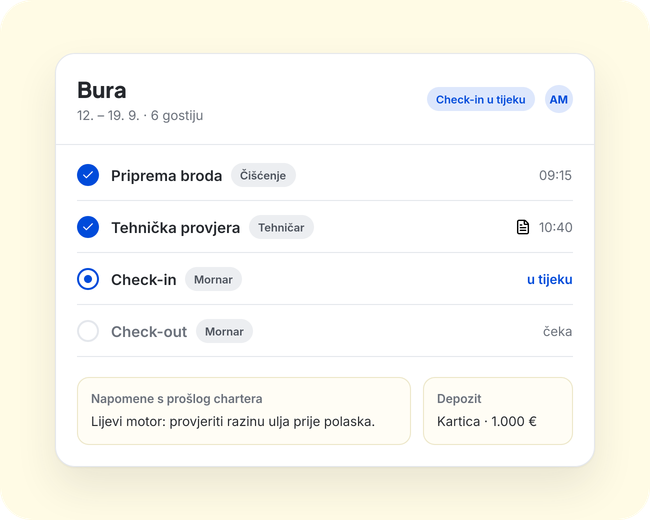
Every charter on one board, with a readiness label and step-by-step progress. You know what is done, what is late and who is doing what.
How it works
- 1
A charter lands on the board
Boat, dates and crew in one place. Add the guest's phone and the deposits.
- 2
The team works on the phone
Each team member sees what is assigned to them under “My tasks”, by boat and day.
- 3
The board changes live
When someone finishes a step, the readiness label and progress update. At the end you complete the charter with the check-out time.
What you get
- Every charter on the board has a readiness label and step-by-step progress
- A crew member is assigned to each charter
- Guest phone and deposits (card or cash, deposit or insurance) kept with each charter
- Notes from the previous charter of the same boat carry over to the next one
- The board updates live
- A charter is completed explicitly, with a check-out time
- Each team member sees their own tasks on the phone (“My tasks”)
Who uses it
- Owner and base manager: an overview of the whole base without asking around in groups
- Office: crew, deposits and notes with every charter
- Crew: only their own tasks, right on the phone
Questions and answers
Does everyone see the whole board?
No. The office sees the whole base on the board, and each team member sees only their own tasks on the phone.
Do notes carry over to the next charter?
Yes. Notes from the previous charter of the same boat show up with the next one.